|
Product Maintenance |
  
|
|
Product Maintenance |
|
Often, when you are performing certain functions within ManStat, you will be presented with a Product Code field. Clicking on the associated Find or Lookup button located next to this field will reveal the Find Product screen, which you can use to quickly identify the correct product code to be entered.
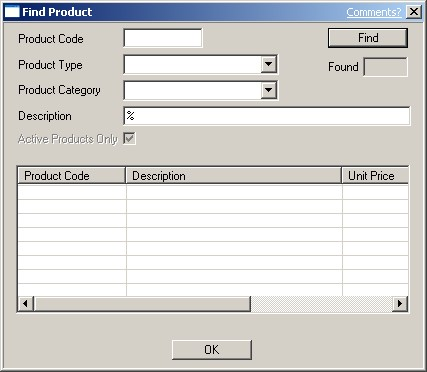
This screen allows you to quickly find an existing product code by simply entering one or more search criteria, for example a particular product type or product category. This may be necessary when entering a new transaction or modifying existing transactions.
Enter the details known into the relevant fields. If you do not know the complete details, simply enter the characters known and insert a Wildcard for the missing characters. For more information on the use of Wildcards, please refer to the Help chapter entitled "Wildcards". Then click on the Find button (or press the Enter key on your keyboard).
If more than two hundred entries meet the search criteria entered, ManStat will ask you to further refine the search criteria. If there are less than two hundred matching products, they will be listed in the list view field at the bottom of the Find Product screen. The total number of matching entries found will be displayed in the Found display box. Simply scroll down and select the required entry. Once the correct entry is highlighted simply click on the OK button located at the bottom of the Find Product screen, or double click on the required entry. ManStat will then return you to your previous function, automatically inserting the correct product code in the required field.