|
Adding a New Product |
  
|
|
Adding a New Product |
|
To create a new product within ManStat, simply click on the Add button located at the bottom of the Product Maintenance screen. (For more information on the Product Maintenance screen, please refer to the Help chapter entitled "Product Maintenance".) This will reveal the Add Product screen.
Enter a unique code for the new product in the Product Code field, and then select the correct type of product from the drop down list associated with the Product Type field. The product type allows you to group products together that have similar traits or aspects. This grouping of products into types allows you to better manage your campaigns or fund raising activities.
If you do not wish to continue with the creation of this new product, simply click on the Cancel button located at the bottom of this screen.
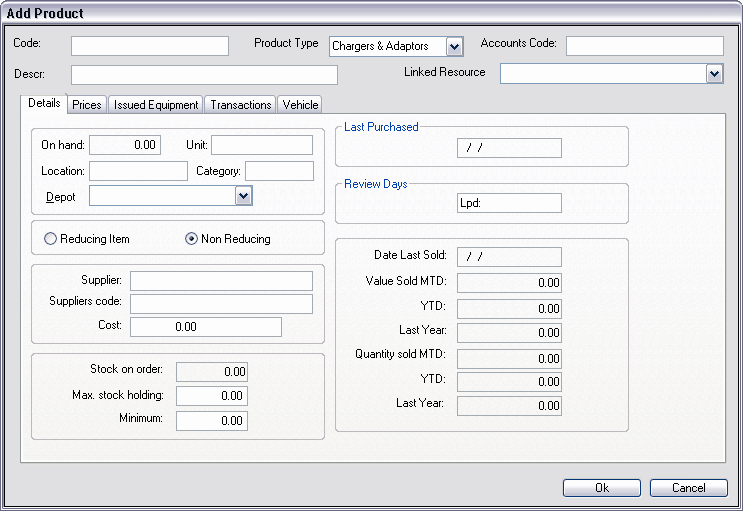
At the top of the screen the Product Code and the Product Type are automatically displayed. Below these fields are the Description field and the Linked Resource field.
Enter a brief description of the new product in the Description field, and then select the correct product category for this new product from the drop down list associated with the Product Category field. In order to best suit the particular needs of your organisation, ManStat allows you to edit the product categories contained in this drop down list. for more information on how to edit these categories, please refer to the Help chapter entitled "Product Category Maintenance".
If this product is currently active, simply click on the check box entitled Active. If this check box is not ticked, ManStat will not allow you to accept any transactions for this product.
The Add Product screen contains many tabs, each displaying different types of information about this product. Most of this information can be edited by you, however some of the information is automatically updated by ManStat, and therefore many of the fields displayed are read only fields.
The types of tabs that are displayed will be different for each Product Type. For an explanation of each tab, please refer to the Help chapter entitled "Product Tabs".Once you have entered the required information in all the fields contained in the Add Product screen and its tabs, simply click on the OK button located at the bottom of the screen. ManStat will then return you to the Product Maintenance screen. If you do not wish to continue with the creation of this new product, simply click on the Cancel button located at the bottom of the Add Product screen.