|
Personal Tab |
  
|
|
Personal Tab |
|
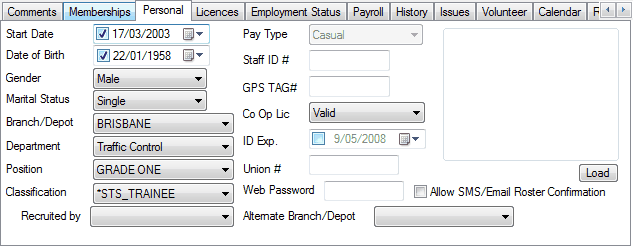
This tab details personal information that is specific to this contact, including gender, marital status, date of birth and religion. Many of these fields can be edited by using the associated drop down lists.
The gender and marital status of this contact can be selected from the drop down lists associated with the Gender field and the Marital Status field.
Below these two fields is the Date of Birth field and the Age field. If you are unsure of the date of birth of this contact, simply enter an approximate date and then select the Approx check box located next to the Date of Birth field.
Below the Age field is the Maiden Name field, which allows you to record the last name of this contact before marriage, and two Date fields. These Date fields can be used by your organisation to record any other dates that are relevant to this contact.
ManStat will keep a record of when this contact was created within the system, and which operator created this contact. ManStat will also record when this contact's information was last modified, and by whom. For your easy reference, this information will be displayed in the read only fields located at the bottom right of the Personal tab.