|
Merging Contact Records |
  
|
|
Merging Contact Records |
|
Sometimes you may discover that you have more that one contact entry stored on your database for the same individual or company. This may be determined either by performing a de dupe on your contact list using List man or ManStat. It may be discovered by an operator or reported by the contact. In this situation it is necessary to eliminate the duplicate contact record from use. However important information may have been stored in each of the contact records because of this we not only need to eliminate the record but when we do so, move all vital details stored against that record to the contact record we wish to retain.
ManStat makes this process relatively simple through the Merge Contacts facility. To utilise this facility simply delete the duplicated record from Contact Maintenance and ManStat will provide this screen before allowing deletion.
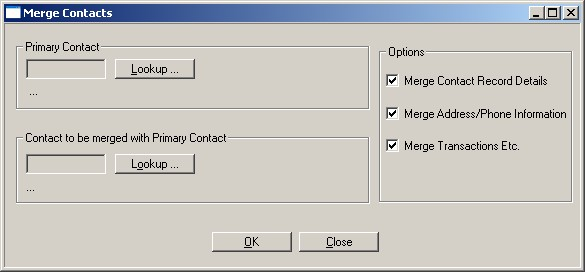
Before merging the two records you should determine which of the two records is most up to date. This record should become your primary record with the other record becoming the record to be merged with your primary.
To merge two contacts together specify the primary contacts record in the Primary Contact section, specify the contact record to be merged with the primary contact in the Contact to be Merged section.
There are three additional options provided to you on the Merge Contacts window. Merge Contact Record Details gives you the option of having ManStat merge such details as those found on the Personal , Company and Miscellaneous tabs. Eg if you have a date of birth on the record to be merged but not on the primary record the date of birth will be copied over automatically for you. The operator should check at the completion of the merge process that all details they wish to have copied have in fact been copied as there are various reasons which may prevent ManStat from doing so during the merge process.
The second option is to Merge Address/Phone Information this option will cause any address or phone record details to be automatically merged where they do not already exist against the primary contact record. Eg if the contact to be merged record has a home address recorded against it but the primary contact record does not then this home address will copied across to the primary record. If for example there is a mailing address stored against both records then no action will be taken with respect to the mailing address of the contact being merged. Users are responsible for verifying that all details have been merged in the manner they desired.
The final option is called Merge Transactions etc , this option will cause any transactional information including transactions, mailings, interactions etc to be transferred from the contact being merged to the primary record. Note that this will cause them to be removed from the contact record being merged. Any summary information such as transaction summary details on the primary contact record will then need to be updated. This normally occurs automatically when the stored procedure to update this information executes against the database. Generally this occurs every evening or each weekend. You should check with your systems supervisor to ensure that this procedure will be executed.
All three of the options default to being selected, meaning that the majority of information stored against the contact being merged will be copied or moved to the primary contact record. The contact being merged will also be marked as having been merged through the setting merged contact flag in the flags window. Subsequent attempts to open the merged contact record will cause a warning dialog to be displayed to the operator.
It should be noted that the merged contact records process is irreversible while the record being merged can be reactivated, any information which was transferred or copied from it can not be moved back. For this reason a great deal of care should be taken to ensure the correct records are being merged. Once the merged contacts process has been completed you will be given the option to view the log entry for that merge process. This entry contains details of what occurred during the merge process. This log should be checked to verify that the process executed in the manner you desired. The operator should also manually check both contact records after the merge process has been completed. ManStat