|
External Resources |
  
|
|
External Resources |
|
ManStat generic has been able to bill issued equipment on a weekly basis for clients since version3.5. Version 7.0 introduces the ability to set billing parameters per item supplied e.g. daily/weekly/monthly rates and parts thereof or single shot charges and improves the intuitive use of equipment only job booking. The side benefit is that hired/issued equipment will be billed and tracked until returned to the depot, thus improving recovery rates for signage and minor supplied items.
Booking an External Resource (traffic control plan, permit etc)
After booking the TCP (traffic control plan) in as either an equipment only or as a part of a job(make note of the job number – you will need to enter it, a quick way of this is copying the number so you can paste it into the box provided shortly), go to MAIN FUNCTIONS -> EXTERNAL RESOURCE MAINTENANCE, as below.


When The EXTERNAL RESOURCE MAINTENANCE box appear type in the job number (or alternatively paste it) into the box provided. Press FIND. You will notice that "No records met the supplied search information". Press ADD at the left had bottom of the box. The below will appear. Note the Resource No.
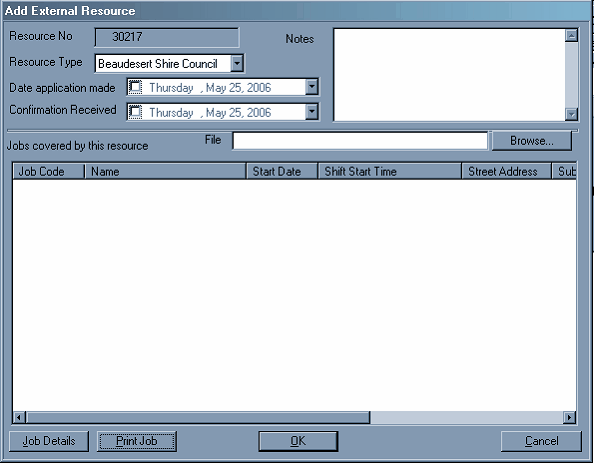
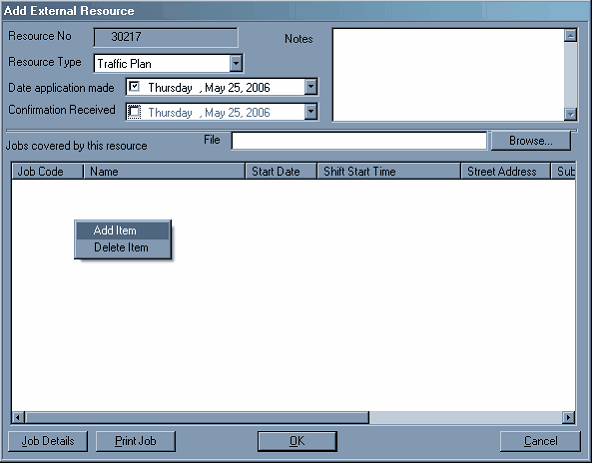
Use the down arrows next to DATE APPLICATION MADE – to put in the date, and likewise with the CONFIRMATION RECEIVED date. You then must right-click in the white square and ADD ITEM. Retype the Job Number (or paste it in) and double click the job, as below.

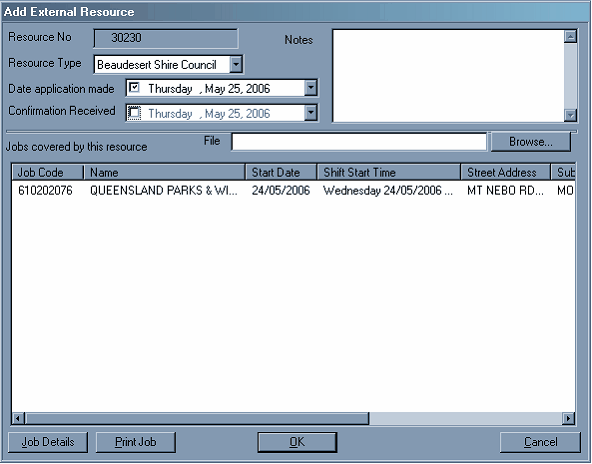
Then press OK. This will then charge out for the TCP on that job.