|
Merge Contact Screen |
  
|
|
Merge Contact Screen |
|
When deleting two contacts with the same or similar names, the following screen will appear
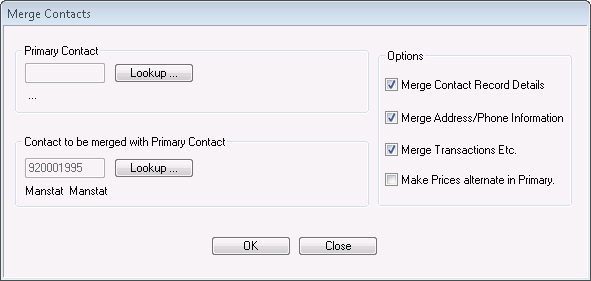
If you are deleting a double up, merging the two contacts is recommended so that important information is kept from both contacts.
1. Select the top Lookup button to locate the other or primary contact to merge with the contact that is being deleted (shown in the box below).
2. Click OK
It is recommended that the already ticked boxes on the right of the screen (Options) are kept ticked as to not lose any information when merging.
Merge contact record details will attempt to copy basic information if blank in the destination
Merge address/phone will attempt to copy data if not pre-existing in the destination
Merge Transactions should be carefully considered – but is normally desired
Make Prices Alternate in Primary – if merging a client will copy the source pricing to the alternate in the destination.