|
Company Tab Explained |
  
|
|
Company Tab Explained |
|
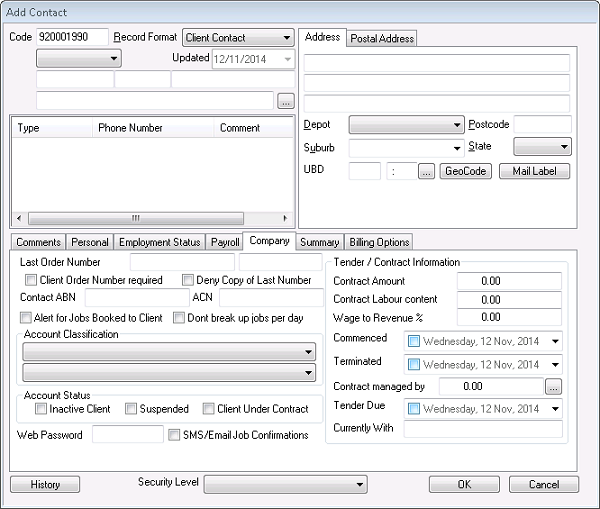
Last order number (alpha/numerical field) – shows last order number used for this client on a job
Client order number required (tick box) – is a client order number required?
Deny copy of last number (tick box) – do you want to deny the last purchase order number used to book a job?
Contact ABN (numerical field) – the client ABN is entered here
ACN (numerical field) – the client ACN is entered here
Alert for jobs booked to client (tick box)
Don’t break up jobs per day (tick box)
Account classification (drop down boxes) – will create all shifts under the one job if more than one day
Account status
Inactive client (tick box) – is client no longer using your services?
Suspended (tick box) - useful when client has outstanding invoices but no more jobs are to be booked under them
Client Under Contract (tick box) – if ticked will go to Tender/Contract Information side of tab to determine how client billed etc.
Web password (alpha/numerical field) – password for SMS/Email job confirmation to client
SMS/Email Job Confirmations (tick box) – do you want to send client job SMS or Email confirmations?
Tender/Contract Information
Contract Amount (numerical field) – what is the total contract amount?
Contract Labour content (numerical field) – what is the total labour content amount?
Wage to Revenue % (numericalfield) – what is the percentage of wages out of total revenue?
Commenced (date/tick box) – date contract commenced
Terminated (date/tick box) – date contract terminated
Contract managed by (alpha/numerical field) – who the contract is managed by (in house)
Tender Due (date/tick box) – date tender is due
Currently With (alpha/numerical field) – who the tender is currently with (company name)