|
Manual Timesheets |
  
|
|
Manual Timesheets |
|
If there is a need to add a sick day or annual leave onto an employee’s timesheet, you can do so by entering it in manually onto their timesheet before the pay run for the week is completed.
1. Go to Administration, Verify Employee Timesheets
2. Select the depot from the drop down menu located top left of the Verify Employee Timesheet screen and then select the required employee from the employee list (employee has to have a ManStat generated code next to their name for the timesheet to be active/cannot be an unallocated timesheet)
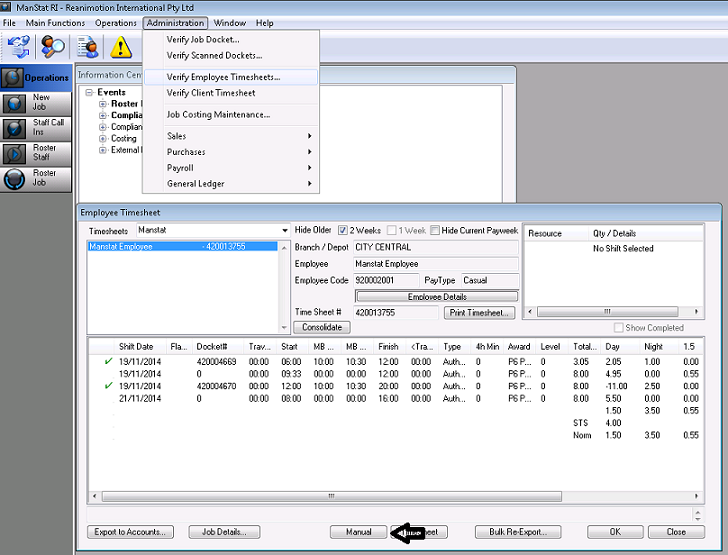
3. Click on the Manual button located at the bottom of the Verify Employee Timesheet screen and the following screen will appear
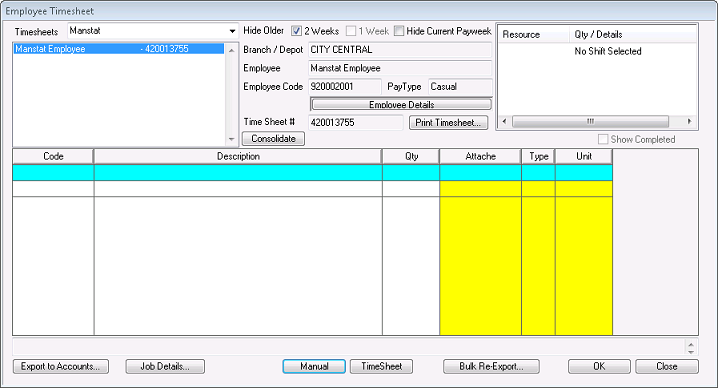
4. From here, enter in the Pay Code for the desired requirement, enter a plus or minus quantity in the Qty column and press the Tab key on your keyboard.
Once you have completed entering all the desired components manually into the timesheet, press OK. When the pay run is completed, the manual charges added along with whatever the employee was originally required to be paid will be exported.