|
Regional Public Holiday Set Up |
  
|
|
Regional Public Holiday Set Up |
|
In certain states of Australia, there are public holidays for selected regions only or public holidays that are taken on different days to the rest of the state/country. ManStat can accommodate this as follows:
1. Go to File, System Setup, Lookup Table Maintenance. Select Public Holiday Region from the Lookup Type drop down menu and press Find to make sure you are not adding a region that already exists in ManStat.
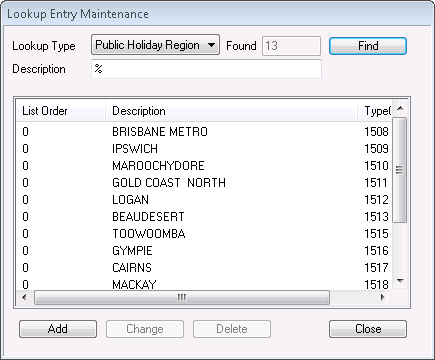
2. Select Add and type a description of the region and/or type of holiday.
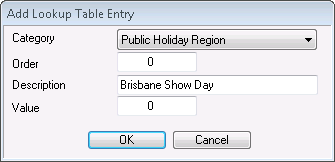
3. Press OK.
4. Still in Lookup Table Maintenance, select Depot from the Lookup Type drop down list and press Find. The list of existing depots will appear.
5. Select the Add button and type in the description of the new depot to match the public holiday region created.

6. Press OK.
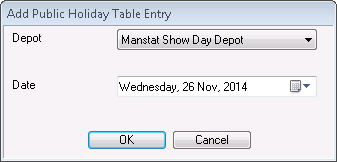
7. Now go to File, System Setup, Public Holidays and select the Add button.
8. Select the newly created depot along with the date that it occurs and press OK.
9. Find the employees that would come under said region in Contact Maintenance. In their Payroll tab, click on the drop menu entitled Region/Depot for Public Holidays and select the newly created region.
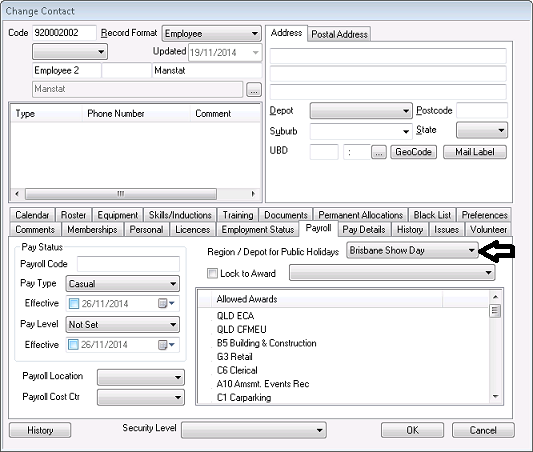
10. Press OK.