|
Overtime Authorisation |
  
|
|
Overtime Authorisation |
|
Employees are obligated to keep Roster's Staff informed of any and all overtime prior to its performance on a daily basis. Employees must contact Rosters no later than seven (7) hours into the rostered shift, and they must provide an estimate of the job duration (if the job is expected to last more than ten (10) hours or more. This call is to be logged by Rosters, more precisely the operator who takes the call. It is to be logged in the "Overtime Call In" section.
Go to "Operations" scroll down and left click on "Overtime Call In" Shown Below.
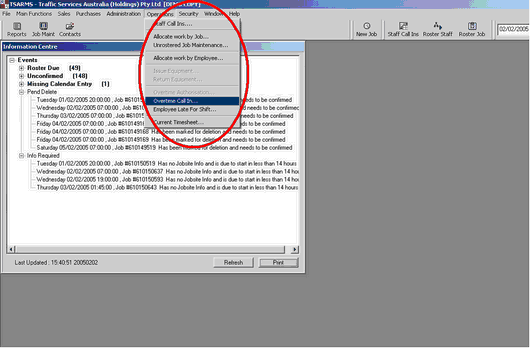
The Below screen will appear.
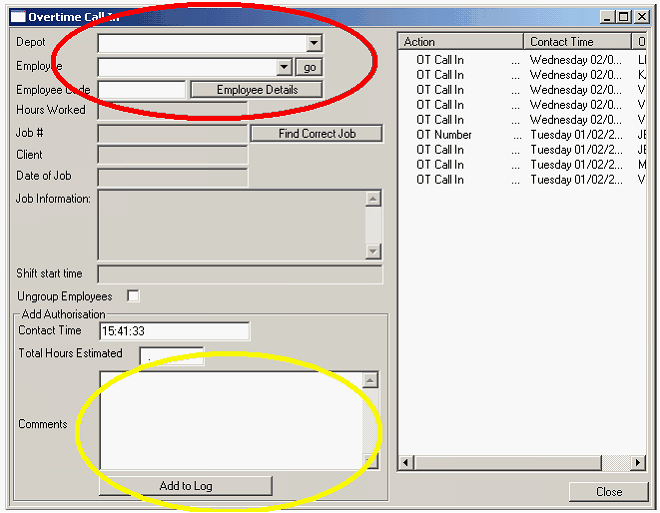
Fill out the "Depot" & "Employee boxes" like you would for a "Roster Call-In" (see Roster Call In). In the box called "Total Estimated Hours" fill in how many hours you anticipate the job will last. In the box circled in YELLOW, explain the reason for such a long job, be thorough. Then press the "Add To Log" button. This is a very important process to complete.
NB: This procedure must be repeated should the original estimate change. All calls that are made by the Employees must be recorded in the Overtime Log
NB: Basic level rosters staff are unable to issue Overtime numbers for work over 12 hours. Employees should not be working over 12 hours, "Relief" should be organised when you are informed that a job will exceed 12 hours. (see Relief)
NB: No Employee shall be paid for Overtime without this process, when system rules are set to require authorisation.