|
Reset & Re-exports for Payroll |
  
|
|
Reset & Re-exports for Payroll |
|
***Note that resetting will remove any history or audit trail of the previous payroll run. This function is at the users discretion and should be used with extreme caution
Resetting
1. Go to Administration, Verify Employee Timesheets
2. Select the Export to Accounts button located towards the bottom left hand corner of the Verify Employee Timesheets screen.
3. In the ‘or Re-Export’, select the date that needs to be reset.
4. Select the RESET RUN button.
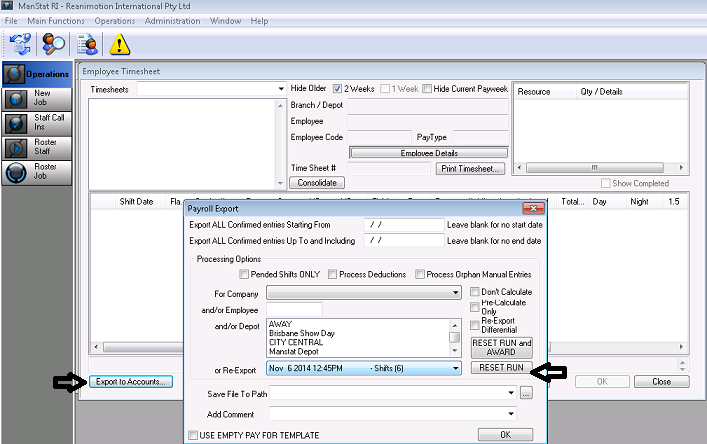
Re Exporting
Note that re-exporting keeps an audit trail of the previous export run and is the preferred option
1. Go to Administration, Verify Employee Timesheets
2. Select the Export to Accounts button located towards the bottom left hand corner of the Verify Employee Timesheets screen.
3. In the ‘or Re-Export’, select the date that needs to be reset.
4. Press OK.
*** Note: The For Company and Employee fields can be selected here along with the ‘or Re-Export’ date to just focus on re-exporting those selections.