|
Security Functions |
  
|
|
Security Functions |
|
Security functions are particular functions that can be accessed or operated within ManStat. By defining which functions can be used by a particular operator, it is possible to limit an operator's access throughout the ManStat system. Most of the security functions available in ManStat will be defined when ManStat is installed, however it is possible to create and delete additional security functions which can then be used to limit operator access to such things as history items and bequests. For more information on history items, please refer to the Help chapters entitled "contact Maintenance" and "Creating a New contact".
These security functions can then be collected together into security groups, which can be allocated to individual operators. In this way, ManStat allows you to tailor each operator's access abilities to perfectly meet their specific requirements. (For more information on security groups, please refer to the Help chapter entitled "Security Groups Maintenance".)
To create a new security function, or to delete an existing security function, simply select System from the setup menu located at the top of the ManStat screen, and then select Security Functions Maintenance. This will reveal the Security Functions Maintenance screen.
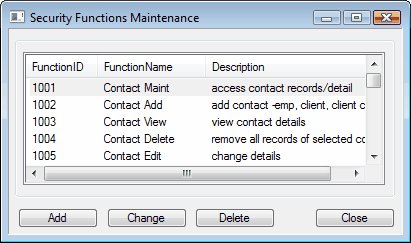
This screen will list all existing security functions as separate line items. The first column details the FunctionID (which is a unique code for each function), the second column details the name of the function, and the third column contains a brief description of this function.
To delete an existing function, simply click on the relevant line item and then click on the Delete button located at the bottom of the Security Functions Maintenance screen. This will reveal a Delete screen. If you are sure you wish to continue with the deletion of this security function, simply click on the Yes button, however if you do not wish to continue with this deletion simply click on the No button.
If you wish to create a new security function, simply click on the Add button located at the bottom of the Security Functions Maintenance screen. This will reveal the Add Security Function screen.
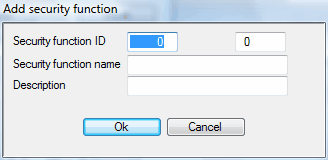
In the Security Function ID field, enter a numerical code for this new function. Please note that ManStat will not allow you to create a new function with the same numerical code as an existing function.
Then enter a security function name and a brief description of this new function in the relevant fields, and click on the OK button located at the bottom of the Add Security Function screen. The new function will now be displayed in the Security Functions Maintenance screen.
If you do not wish to continue with the creation of this new function, simply click on the Cancel button located at the bottom of the Add Security Function screen.
Once you have made the required additions or deletions to the list of security functions, simply click on the Close button located at the bottom of the Security Functions Maintenance screen. For a detailed list of all system security functions and a brief description of each, please refer to Appendix A: Security Functions. (System security functions are security functions that are inherent to ManStat, as opposed to security functions that have been created or modified by an operator.)