|
Lookup Table Maintenance |
  
|
|
Lookup Table Maintenance |
|
ManStat allows you to enter various types of lookup list entries for an associated drop down list. To successfully meet your organization's specific requirements, ManStat allows you to modify the selections contained in these drop down lists.
The screen to maintain the list, can be selected by clicking on the File menu at the top of the ManStat screen, then selecting System Setup, and then selecting Lookup Table Maintenance. This will reveal the Lookup Table Maintenance screen.
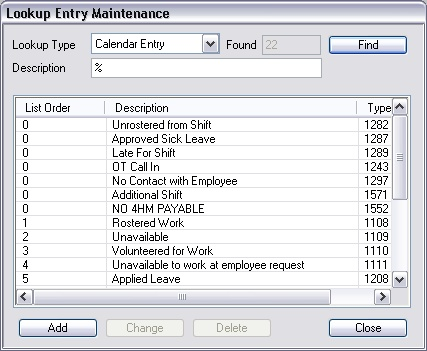
Simply click on the Find button at the top right of this screen, and all the current types' entries will be listed. To add a new entry, simply click on the Add button at the bottom of this search screen. This will reveal the Add Lookup Entry screen.
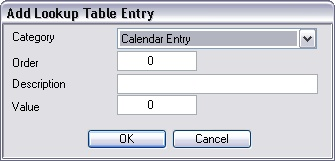
Simply enter the new item required in the Description field, and then click on the OK button located at the bottom of this screen. If you do not wish to continue with the creation of this new entry, simply click on the Cancel button located at the bottom of this screen.
To change an existing entry, simply click on the item requiring change and then click on the Change button at the bottom of the search screen, or double click on the entry. This will reveal the Change Address Type screen. Simply make the required changes, and then click on the OK button located at the bottom of the Change Address Type screen. If you do not wish to continue with these changes, simply click on the Cancel button located at the bottom of this screen.
To delete an item, simply click on the entry you wish to delete, and then click on the Delete button at the bottom of the search screen. This will display a confirmation screen. Check the details displayed to ensure this is the correct entry to be deleted, and then click on the Delete button located at the bottom of this screen. If you do not wish to continue with the deletion of this address type, simply click on the Cancel button located at the bottom of this screen.
Please note that if an entry is currently being used for any contact, ManStat will not allow you to delete it.