|
Creating Quotations |
  
|
|
Creating Quotations |
|
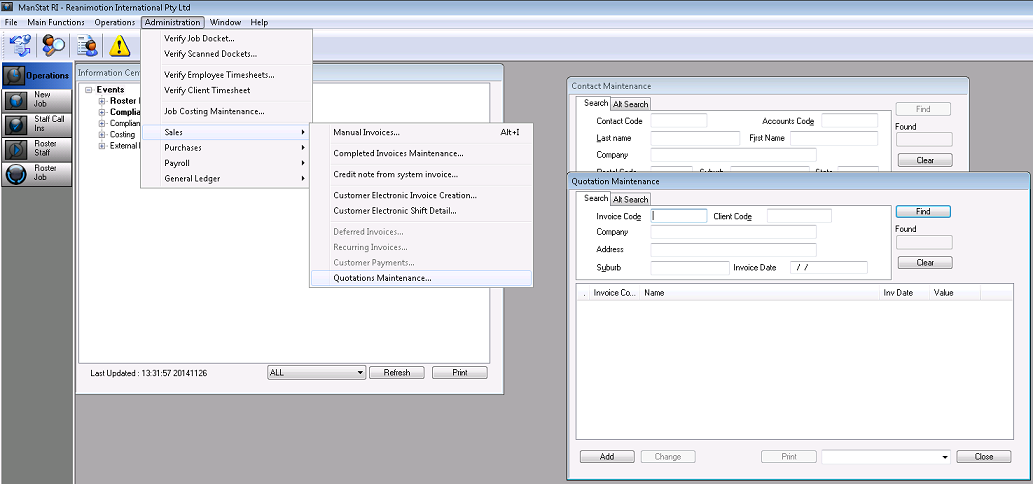
1. Go to Administration, Sales, Quotations Maintenance and the following screen will appear.
2.Before selecting add, click on Contact Maintenance Icon  and find clients Contact Code (refer to Chapter 3.6 Find and Update Contact Details)
3. Press the Add button in Quotation Maintenance Screen
4. Find the Contact Code of the client that the quote is getting created for in the top left corner of the Customer Quotations screen from the drop down list.
5. Enter the date required for the quotation (ManStat at this point has created an automatically generated quotation number).
6. Enter a reference (this can be whatever you want it to be).
7. Enter the depot location.
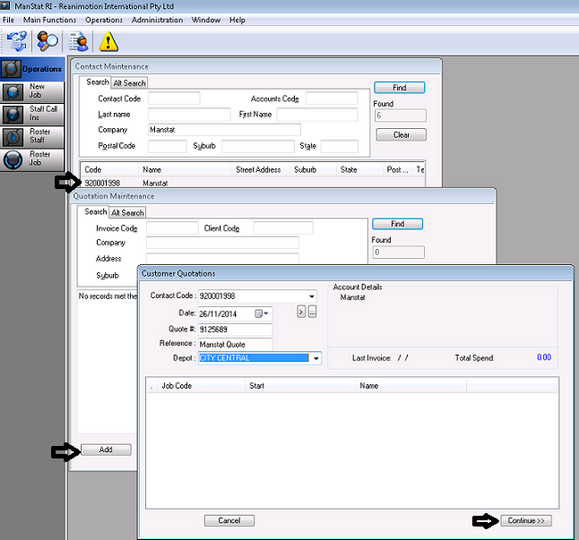
8. Click Continue on the bottom right hand corner of the screen, the following screen will appear.
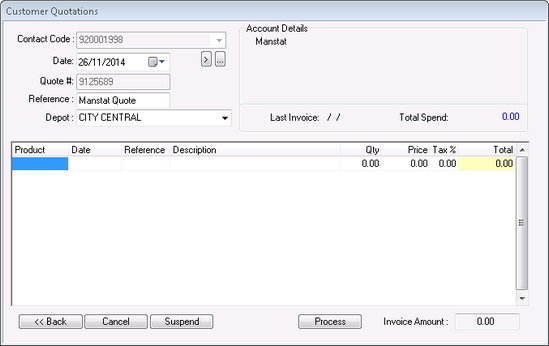
9. Here the product codes are entered in the Product column, also select a quantity in the Qty column and press the tab button. The amounts are calculated automatically (you can find a list of product codes by going to Reports/Master Setup/Invoicing Product Code Setup Matrix)
10. Once the quote is complete, if you press the Suspend button, it will hold the quotation created in ManStat for future editing if necessary. If you select Process, ManStat will lock the quote and it will not be able to be edited. From here, the screen will disappear, leaving the Maintenance screen open. You can find the quote created by entering in desired search criteria (e.g. Company, date etc.) and press Find. Printing of the quotation can be achieved by highlighting desired quote and pressing the Print button